> ## Documentation Index
> Fetch the complete documentation index at: https://tyk.io/docs/llms.txt
> Use this file to discover all available pages before exploring further.
# Getting Started with Tyk
> Quickly set up Tyk Self-Managed with our comprehensive guide, including installation options and demo environments.
export const ButtonLeft = ({href, color, content}) => {
const buttonStyle = {
display: 'inline-block',
padding: '5px 16px',
fontSize: '14px',
fontWeight: '500',
textDecoration: 'none',
borderRadius: '25px',
transition: 'all 0.2s ease',
cursor: 'pointer',
border: '1.2px solid black'
};
const colorStyles = {
green: {
backgroundColor: '#20EDBA',
color: 'black'
},
red: {
backgroundColor: '#dc2626',
color: 'white'
},
black: {
backgroundColor: '#1f2937',
color: 'white'
}
};
const hoverStyle = {
transform: 'translateY(-1px)',
boxShadow: '0 4px 8px rgba(0,0,0,0.15)'
};
const finalStyle = {
...buttonStyle,
...colorStyles[color] || colorStyles.black
};
return {
Object.assign(e.target.style, hoverStyle);
}} onMouseLeave={e => {
e.target.style.transform = 'translateY(0)';
e.target.style.boxShadow = 'none';
}}>
{content}
;
};
## Introduction
Tyk Self-Managed is a full-featured API management platform that you deploy and control on-premise, within your own infrastructure. This page will guide you through setting up and exploring your Self-Managed Tyk environment.
### What's included in your trial
Your Tyk Self-Managed trial includes:
* **[Tyk Gateway](/tyk-oss-gateway)**: The core API Gateway that handles all your API traffic
* **[Tyk Dashboard](/api-management/dashboard-configuration)**: A [REST API](/api-management/dashboard-configuration#exploring-the-dashboard-api) with a [web interface](/getting-started/using-tyk-dashboard) for managing your APIs, policies, and monitoring
* **[Developer Portal](/portal/overview/intro)**: A customizable API portal to securely publish and manage API access for your consumers.
* **Monitoring**: Detailed insights into API usage and performance
* **Sample APIs**: Pre-configured APIs to help you explore Tyk's capabilities
### System Requirements
* **Docker**: [Docker Engine](https://docs.docker.com/engine/install/) 24.0 or newer
* **Docker Compose**: [Docker Compose](https://docs.docker.com/compose/install/) v2.20 or later
* **CPU & Memory**: Minimum 4 GB RAM and 2 CPU cores
* **License Key**: A valid Tyk Self-Managed license key.
You can quickly get started with a self-managed trial license by completing the registration on our [website](https://tyk.io/self-managed-trial). After registering, you’ll receive an email containing your license key.
If you’d rather have guided assistance, we recommend checking out our [Tyk Technical PoC Guide](https://tyk.io/customer-engineering/poc/technical-guide/).
### Trial Duration and Limitations
Your trial license is valid for **14 days from activation**. During this period, you have access to all Enterprise features. After the trial period, you’ll need to purchase a license to continue using Tyk Self-Managed.
To continue using Tyk Self-Managed after your trial, please contact our [team](https://tyk.io/contact/) to discuss licensing options.
## Quick Setup
This section provides a step-by-step guide to quickly set up Tyk Self-Managed using Docker.
### Prerequisites
1. Install [Docker Engine](https://docs.docker.com/engine/install/) 24.0 or newer and [Docker Compose](https://docs.docker.com/compose/install/) v2.20 or later
2. Install the following CLI tools:
* [Jq](https://stedolan.github.io/jq/download/) (for JSON processing)
* [Git](https://git-scm.com/downloads) (for cloning Github repository)
* [curl](https://curl.se/download.html) (for making API requests)
3. Tyk Self-Managed license key (from your trial email)
* If you are having issues with your trial license, please contact [info@tyk.io](mailto:info@tyk.io)
### Installation
1. Clone the repository and navigate to the self-managed Docker directory:
```bash theme={null}
git clone https://github.com/TykTechnologies/tyk-install
cd tyk-install/docker/self-managed
```
2. Copy the example environment file and add your license keys:
```bash theme={null}
cp .env.example .env
```
Open `.env` and set your license keys:
```bash theme={null}
TYK_LICENSE_KEY=
TYK_PORTAL_LICENSE=
```
3. Start the Tyk stack:
```bash theme={null}
cd ../getting-started
bash start.sh
```
This command starts all the necessary containers and automatically bootstraps the environment with pre-configured APIs, policies, and portal setup. The process may take up to 60 seconds on first run.
Containers started:
* Tyk Gateway
* Tyk Dashboard
* Developer Portal
* Redis (caching and session storage)
* PostgreSQL (data storage)
* Tyk Pump (analytics)
* Sample API service (httpbin)
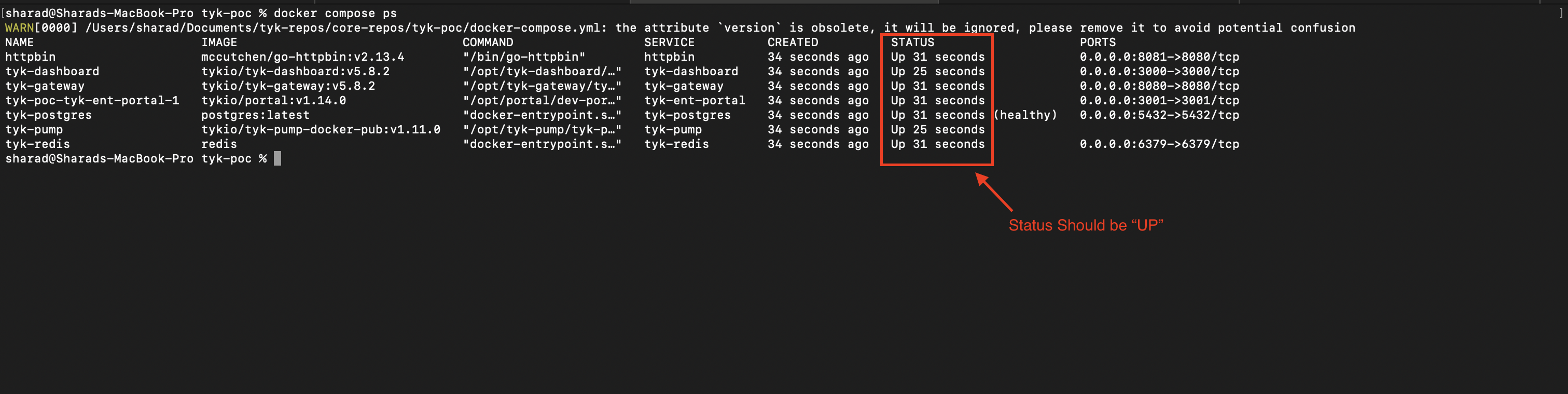
4. Once all containers are running, you can verify their status with:
```bash theme={null}
docker ps
```
You should see all services listed as "Up".
 ### Default Credentials and Access Points
Once the installation is complete, you can access the following components:
```
---------------------------
Your Tyk Dashboard URL is http://localhost:3000
user: developer@tyk.io
pw: specialpassword
---------------------------
Your Tyk Gateway URL is http://localhost:8080
---------------------------
Your Developer Portal URL is http://localhost:3001
admin user: portaladmin@tyk.io
admin pw: specialpassword
---------------------------
```
### Verifying Your Installation
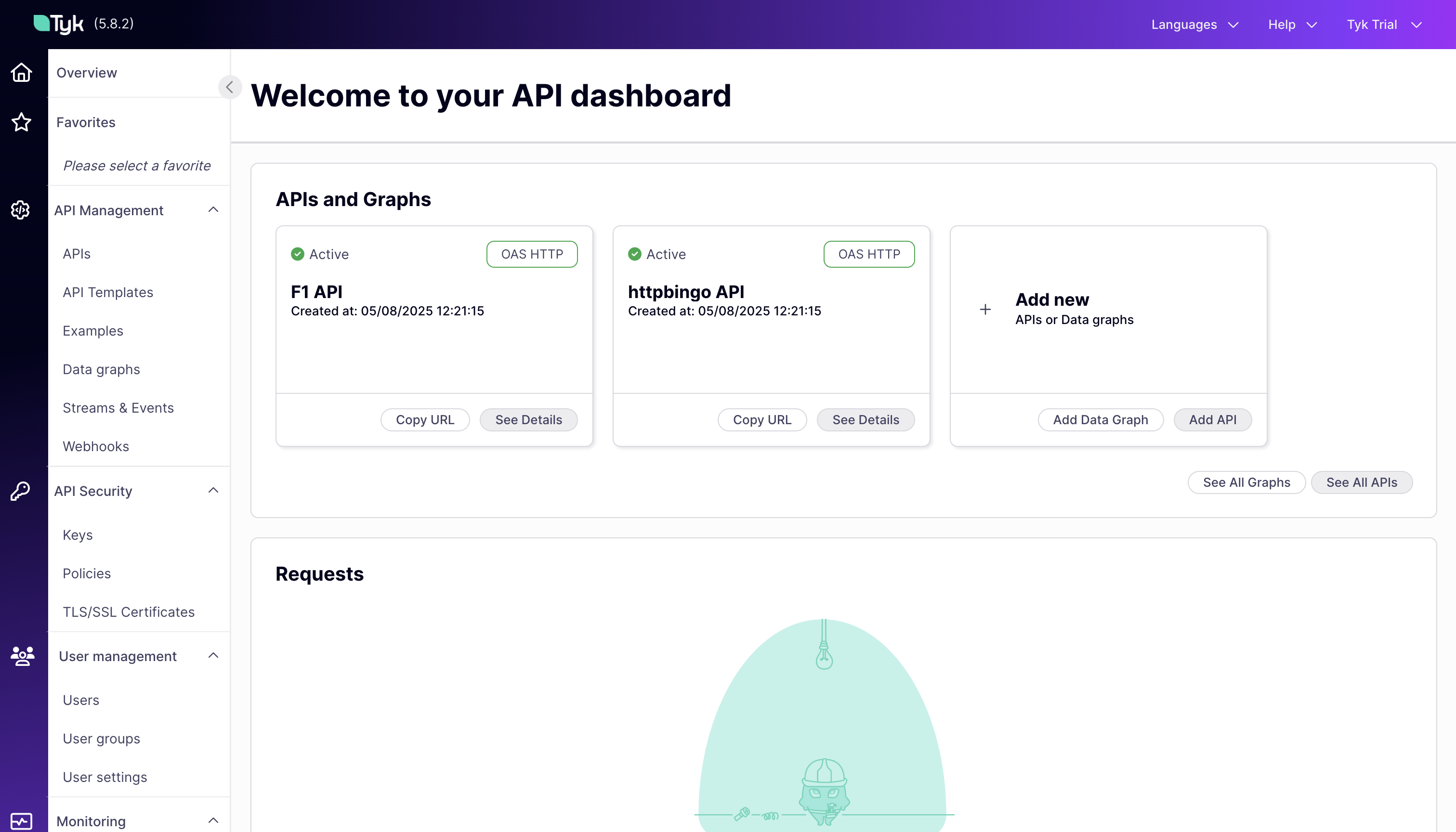
1. **Verify Dashboard Access**:
1. Open your browser and navigate to `http://localhost:3000`
2. Log in with the default credentials ([developer@tyk.io](mailto:developer@tyk.io) / specialpassword)
3. You should see the Tyk Dashboard with pre-configured APIs and monitoring
### Default Credentials and Access Points
Once the installation is complete, you can access the following components:
```
---------------------------
Your Tyk Dashboard URL is http://localhost:3000
user: developer@tyk.io
pw: specialpassword
---------------------------
Your Tyk Gateway URL is http://localhost:8080
---------------------------
Your Developer Portal URL is http://localhost:3001
admin user: portaladmin@tyk.io
admin pw: specialpassword
---------------------------
```
### Verifying Your Installation
1. **Verify Dashboard Access**:
1. Open your browser and navigate to `http://localhost:3000`
2. Log in with the default credentials ([developer@tyk.io](mailto:developer@tyk.io) / specialpassword)
3. You should see the Tyk Dashboard with pre-configured APIs and monitoring
 2. **Verify Gateway Access**:
1. Open a terminal and run:
```
curl -s http://localhost:8080/hello | jq
```
2. You should receive a JSON response from the API, confirming that the Tyk Gateway is functioning correctly.
```json theme={null}
{
"status": "pass",
"version": "5.8.2",
"description": "Tyk GW",
"details": {
"dashboard": {
"status": "pass",
"componentType": "system",
"time": "2025-08-06T10:10:46Z"
},
"redis": {
"status": "pass",
"componentType": "datastore",
"time": "2025-08-06T10:10:46Z"
}
}
}
```
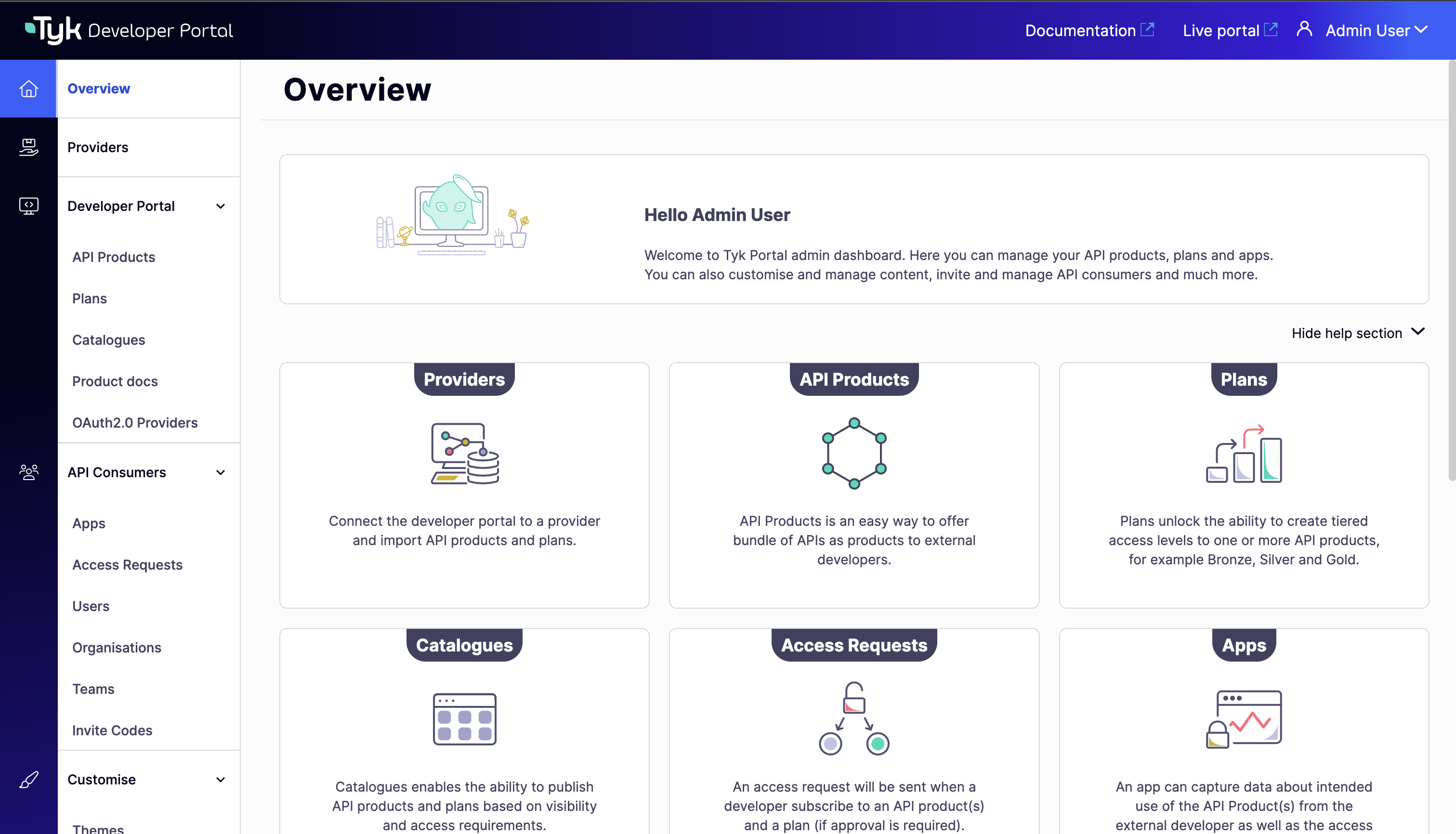
3. **Verify Developer Portal Access**:
1. Open your browser and navigate to `http://localhost:3001`
2. Log in with the default credentials ([portaladmin@tyk.io](mailto:portaladmin@tyk.io) / specialpassword)
3. You should see the `Overview` section of the Developer Portal.
2. **Verify Gateway Access**:
1. Open a terminal and run:
```
curl -s http://localhost:8080/hello | jq
```
2. You should receive a JSON response from the API, confirming that the Tyk Gateway is functioning correctly.
```json theme={null}
{
"status": "pass",
"version": "5.8.2",
"description": "Tyk GW",
"details": {
"dashboard": {
"status": "pass",
"componentType": "system",
"time": "2025-08-06T10:10:46Z"
},
"redis": {
"status": "pass",
"componentType": "datastore",
"time": "2025-08-06T10:10:46Z"
}
}
}
```
3. **Verify Developer Portal Access**:
1. Open your browser and navigate to `http://localhost:3001`
2. Log in with the default credentials ([portaladmin@tyk.io](mailto:portaladmin@tyk.io) / specialpassword)
3. You should see the `Overview` section of the Developer Portal.
 ## Exploring Your Pre-Configured Environment
When you run the Docker Compose command in the previous section, several interconnected components are deployed to create a complete Tyk API Management ecosystem. Let's explore what's installed and how these components work together.
The following diagram illustrates the components of your Tyk Self-Managed installation and how they interact:
## Exploring Your Pre-Configured Environment
When you run the Docker Compose command in the previous section, several interconnected components are deployed to create a complete Tyk API Management ecosystem. Let's explore what's installed and how these components work together.
The following diagram illustrates the components of your Tyk Self-Managed installation and how they interact:
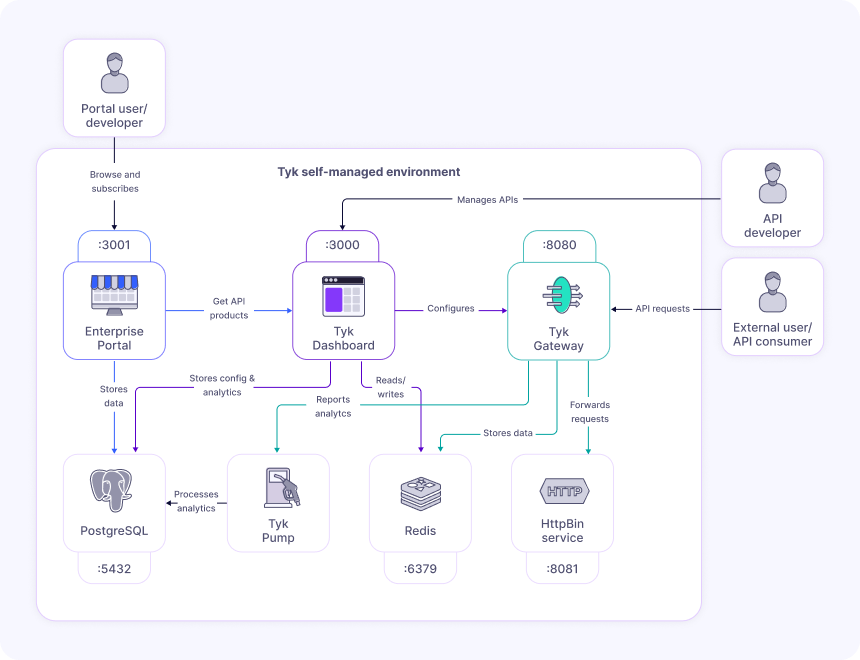 **Key Components:**
1. **Tyk Gateway (tyk-gateway)**: The core API Gateway that processes all API requests, applies policies, and enforces security. Exposed on port 8080.
2. **Tyk Dashboard (tyk-dashboard)**: The management interface for configuring APIs, policies, and viewing monitoring data. Exposed on port 3000.
3. **Developer Portal (tyk-ent-portal)**: A customizable portal for API consumers to discover, test, and subscribe to APIs. Exposed on port 3001.
4. **Redis (tyk-redis)**: Used for caching, session management, and real-time communication between components. Exposed on port 6379.
5. **PostgreSQL (tyk-postgres)**: Stores configuration data, user information, and analytics. Exposed on port 5432.
6. **Tyk Pump (tyk-pump)**: Processes and transfers analytics data from the Gateway to the database for reporting.
7. **HttpBin (httpbin)**: A sample API service that provides various endpoints for testing. Exposed on port 8081.
With these components, you have a fully functional Tyk Self-Managed environment that allows you to manage APIs, monitor usage, and provide a developer portal for your API consumers. Let's explore how to navigate the Dashboard, understand the pre-loaded APIs, and preview the Developer Portal.
### Dashboard Tour
The Tyk Dashboard is your central hub for managing APIs, monitoring performance, and configuring security settings.
Let's explore the main sections available in the sidebar:
#### Navigating the Tyk Dashboard
Dashboard is organized into a few key categories:
* **API Management**: In API Management, you can access and edit all your APIs, create [data graphs](/api-management/data-graph), and add webhooks.
* **API Security**: In API Security, you can manage [keys](/api-management/access-control/sessions-and-keys/understanding-sessions), [Policies](/api-management/policies), and [certificates](/api-management/certificates) to customize your security settings.
* **User Management**: In [User Management](/api-management/user-management), you can control permissions and access for users and user groups. You can also create profiles that help you manage third party identity providers for specific Tyk actions like signing into the portal or logging into the dashboard.
* **Monitoring**: In [Monitoring](/api-management/dashboard-configuration#traffic-analytics), you can view activity reports, logs, and analytics related to your APIs.
* **System Management**: In [System Management](/api-management/dashboard-configuration#extend-permissions-using-open-policy-agent-opa), you can affect OPA rules that define fine-grained access control for managing and enforcing permissions on various actions and resources in Tyk’s API management system.
- **Classic Portal**: In Classic Portal, you can affect permissions and configurations related to your developer portal. The Tyk Developer Portal is a platform that enables you to publish, manage, and promote your APIs to external developers.
For a comprehensive guide to the Dashboard, refer to the [using Tyk Dashboard](/getting-started/using-tyk-dashboard#dashboard-organization) guide.
#### Understanding the Pre-loaded APIs
Your trial environment comes with pre-configured sample APIs to help you explore Tyk's capabilities:
**1. httpbingo API Overview:**
* **Purpose**: A test API with various endpoints for exploring API management features
* **Base URL**: `http://localhost:8080/httpbingo`
* **Authentication**: API Key authentication (via Authorization header)
* **Rate Limiting**: Configured through policies (Sandbox and Production plans)
**Key Endpoints:**
* `/get`: Returns request data (headers, query parameters)
* `/headers`: Shows all request headers
* `/ip`: Returns the client's IP address
* `/xml`: Demonstrates response transformation (XML to JSON)
* `/status/{code}`: Returns specified HTTP status code
* `/mock`: Returns a mock response generated by Tyk
**2. F1 API Overview:**
* **Purpose**: Demonstrates JWT authentication with a real-world API providing Formula 1 racing data
* **Base URL**: `http://localhost:8080/f1-api` (proxies to [https://f1api.dev/api/](https://f1api.dev/api/))
* **Authentication**: JWT HMAC authentication
JWT Authentication Details:
* **Shared Secret**: `topspecial256sharedbitlongsecret`
* **JWT Generation**: You can use [jwt.io](https://jwt.io) to generate valid tokens
* **Header Format**: `Authorization: Bearer `
* **Rate Limiting**: 4 requests per 15 seconds (configured through policy)
**Key Endpoints:**
* `/drivers`: Information about F1 drivers
* `/seasons`: Data about F1 racing seasons
* `/circuits`: Details about F1 racing circuits
* `/teams`: Information about F1 teams
To explore these APIs in detail:
1. In the Dashboard, go to the "APIs" section
2. Click on either "httpbingo API" or "F1 API"
3. Navigate through the tabs to see the various configuration options
4. Pay special attention to the `Endpoints` tab to see how individual endpoints are configured
### Developer Portal Preview
The [Developer Portal](/portal/overview/intro) provides a dedicated space for API consumers to discover, learn about, and subscribe to your APIs. It bridges the gap between API providers and consumers.
As an administrator, you can customize the portal's appearance, content, and behavior to match your brand and requirements.
#### Exploring Available API Products and Catalogs
Login into the portal as an Admin user with credentials provided in the [previous section](/getting-started/quick-start#default-credentials-and-access-points) to explore the resources created in the portal.
The Developer Portal organizes APIs into a structured hierarchy:
**Products, Plans, and Catalogs:**
* **[Products](/portal/api-products)**: API offerings that developers can consume. In your trial, there's a pre-configured product for the [httpbingo API](http://localhost:3001/admin/api_products).
* **[Plans](/portal/api-plans)**: Subscription tiers with different access levels and rate limits. [Your trial includes](http://localhost:3001/admin/plans):
* **Sandbox Plan**: Limited rate (3 requests per 10 seconds) for testing and development
* **Production Plan**: Higher capacity (100 requests per 60 seconds) for production use
* **[Catalogs](/tyk-stack/tyk-developer-portal/enterprise-developer-portal/managing-access/manage-catalogues)**: Collections of products and plans that can be made available to different audiences. Your trial has a public catalog containing the httpbingo API product and both plans.
#### Understanding the developer experience
To experience the portal from a developer's perspective:
1. You can access the [live portal](http://localhost:3001/) using the admin account. This is the public-facing interface for API consumers.
2. From here the API consumer can:
1. Browse the [API catalog](http://localhost:3001/portal/catalogue-products) to see available products
2. View the [API documentation](http://localhost:3001/portal/catalogue-products/httpbin-api-access-1), which is automatically generated from the API definition
3. Create [apps](http://localhost:3001/portal/private/dashboard) and then Subscribe to a [plan](http://localhost:3001/portal/catalogue-products/httpbin-api-access-1) to get access credentials
4. Test the API using the provided examples and your credentials
The Developer Portal streamlines the onboarding process for API consumers, making it easy for them to find, understand, and use your APIs.
## Next Steps
Now that you've set up your Tyk Self-Managed environment and explored the pre-configured components, you're ready to try the core API management capabilities in action.
Continue to the [Core API Management Capabilities](/getting-started/secure-api) guide to explore API security, monitoring, and traffic transformation using the pre-configured APIs.
**Key Components:**
1. **Tyk Gateway (tyk-gateway)**: The core API Gateway that processes all API requests, applies policies, and enforces security. Exposed on port 8080.
2. **Tyk Dashboard (tyk-dashboard)**: The management interface for configuring APIs, policies, and viewing monitoring data. Exposed on port 3000.
3. **Developer Portal (tyk-ent-portal)**: A customizable portal for API consumers to discover, test, and subscribe to APIs. Exposed on port 3001.
4. **Redis (tyk-redis)**: Used for caching, session management, and real-time communication between components. Exposed on port 6379.
5. **PostgreSQL (tyk-postgres)**: Stores configuration data, user information, and analytics. Exposed on port 5432.
6. **Tyk Pump (tyk-pump)**: Processes and transfers analytics data from the Gateway to the database for reporting.
7. **HttpBin (httpbin)**: A sample API service that provides various endpoints for testing. Exposed on port 8081.
With these components, you have a fully functional Tyk Self-Managed environment that allows you to manage APIs, monitor usage, and provide a developer portal for your API consumers. Let's explore how to navigate the Dashboard, understand the pre-loaded APIs, and preview the Developer Portal.
### Dashboard Tour
The Tyk Dashboard is your central hub for managing APIs, monitoring performance, and configuring security settings.
Let's explore the main sections available in the sidebar:
#### Navigating the Tyk Dashboard
Dashboard is organized into a few key categories:
* **API Management**: In API Management, you can access and edit all your APIs, create [data graphs](/api-management/data-graph), and add webhooks.
* **API Security**: In API Security, you can manage [keys](/api-management/access-control/sessions-and-keys/understanding-sessions), [Policies](/api-management/policies), and [certificates](/api-management/certificates) to customize your security settings.
* **User Management**: In [User Management](/api-management/user-management), you can control permissions and access for users and user groups. You can also create profiles that help you manage third party identity providers for specific Tyk actions like signing into the portal or logging into the dashboard.
* **Monitoring**: In [Monitoring](/api-management/dashboard-configuration#traffic-analytics), you can view activity reports, logs, and analytics related to your APIs.
* **System Management**: In [System Management](/api-management/dashboard-configuration#extend-permissions-using-open-policy-agent-opa), you can affect OPA rules that define fine-grained access control for managing and enforcing permissions on various actions and resources in Tyk’s API management system.
- **Classic Portal**: In Classic Portal, you can affect permissions and configurations related to your developer portal. The Tyk Developer Portal is a platform that enables you to publish, manage, and promote your APIs to external developers.
For a comprehensive guide to the Dashboard, refer to the [using Tyk Dashboard](/getting-started/using-tyk-dashboard#dashboard-organization) guide.
#### Understanding the Pre-loaded APIs
Your trial environment comes with pre-configured sample APIs to help you explore Tyk's capabilities:
**1. httpbingo API Overview:**
* **Purpose**: A test API with various endpoints for exploring API management features
* **Base URL**: `http://localhost:8080/httpbingo`
* **Authentication**: API Key authentication (via Authorization header)
* **Rate Limiting**: Configured through policies (Sandbox and Production plans)
**Key Endpoints:**
* `/get`: Returns request data (headers, query parameters)
* `/headers`: Shows all request headers
* `/ip`: Returns the client's IP address
* `/xml`: Demonstrates response transformation (XML to JSON)
* `/status/{code}`: Returns specified HTTP status code
* `/mock`: Returns a mock response generated by Tyk
**2. F1 API Overview:**
* **Purpose**: Demonstrates JWT authentication with a real-world API providing Formula 1 racing data
* **Base URL**: `http://localhost:8080/f1-api` (proxies to [https://f1api.dev/api/](https://f1api.dev/api/))
* **Authentication**: JWT HMAC authentication
JWT Authentication Details:
* **Shared Secret**: `topspecial256sharedbitlongsecret`
* **JWT Generation**: You can use [jwt.io](https://jwt.io) to generate valid tokens
* **Header Format**: `Authorization: Bearer `
* **Rate Limiting**: 4 requests per 15 seconds (configured through policy)
**Key Endpoints:**
* `/drivers`: Information about F1 drivers
* `/seasons`: Data about F1 racing seasons
* `/circuits`: Details about F1 racing circuits
* `/teams`: Information about F1 teams
To explore these APIs in detail:
1. In the Dashboard, go to the "APIs" section
2. Click on either "httpbingo API" or "F1 API"
3. Navigate through the tabs to see the various configuration options
4. Pay special attention to the `Endpoints` tab to see how individual endpoints are configured
### Developer Portal Preview
The [Developer Portal](/portal/overview/intro) provides a dedicated space for API consumers to discover, learn about, and subscribe to your APIs. It bridges the gap between API providers and consumers.
As an administrator, you can customize the portal's appearance, content, and behavior to match your brand and requirements.
#### Exploring Available API Products and Catalogs
Login into the portal as an Admin user with credentials provided in the [previous section](/getting-started/quick-start#default-credentials-and-access-points) to explore the resources created in the portal.
The Developer Portal organizes APIs into a structured hierarchy:
**Products, Plans, and Catalogs:**
* **[Products](/portal/api-products)**: API offerings that developers can consume. In your trial, there's a pre-configured product for the [httpbingo API](http://localhost:3001/admin/api_products).
* **[Plans](/portal/api-plans)**: Subscription tiers with different access levels and rate limits. [Your trial includes](http://localhost:3001/admin/plans):
* **Sandbox Plan**: Limited rate (3 requests per 10 seconds) for testing and development
* **Production Plan**: Higher capacity (100 requests per 60 seconds) for production use
* **[Catalogs](/tyk-stack/tyk-developer-portal/enterprise-developer-portal/managing-access/manage-catalogues)**: Collections of products and plans that can be made available to different audiences. Your trial has a public catalog containing the httpbingo API product and both plans.
#### Understanding the developer experience
To experience the portal from a developer's perspective:
1. You can access the [live portal](http://localhost:3001/) using the admin account. This is the public-facing interface for API consumers.
2. From here the API consumer can:
1. Browse the [API catalog](http://localhost:3001/portal/catalogue-products) to see available products
2. View the [API documentation](http://localhost:3001/portal/catalogue-products/httpbin-api-access-1), which is automatically generated from the API definition
3. Create [apps](http://localhost:3001/portal/private/dashboard) and then Subscribe to a [plan](http://localhost:3001/portal/catalogue-products/httpbin-api-access-1) to get access credentials
4. Test the API using the provided examples and your credentials
The Developer Portal streamlines the onboarding process for API consumers, making it easy for them to find, understand, and use your APIs.
## Next Steps
Now that you've set up your Tyk Self-Managed environment and explored the pre-configured components, you're ready to try the core API management capabilities in action.
Continue to the [Core API Management Capabilities](/getting-started/secure-api) guide to explore API security, monitoring, and traffic transformation using the pre-configured APIs.