

2025-11-25 specification. See Requirements and limitations for the full version and licensing matrix.
As MCP servers move into shared cloud infrastructure, they face the same operational challenges REST APIs faced a decade ago: who can call what, how often, with what credentials, and with what visibility.
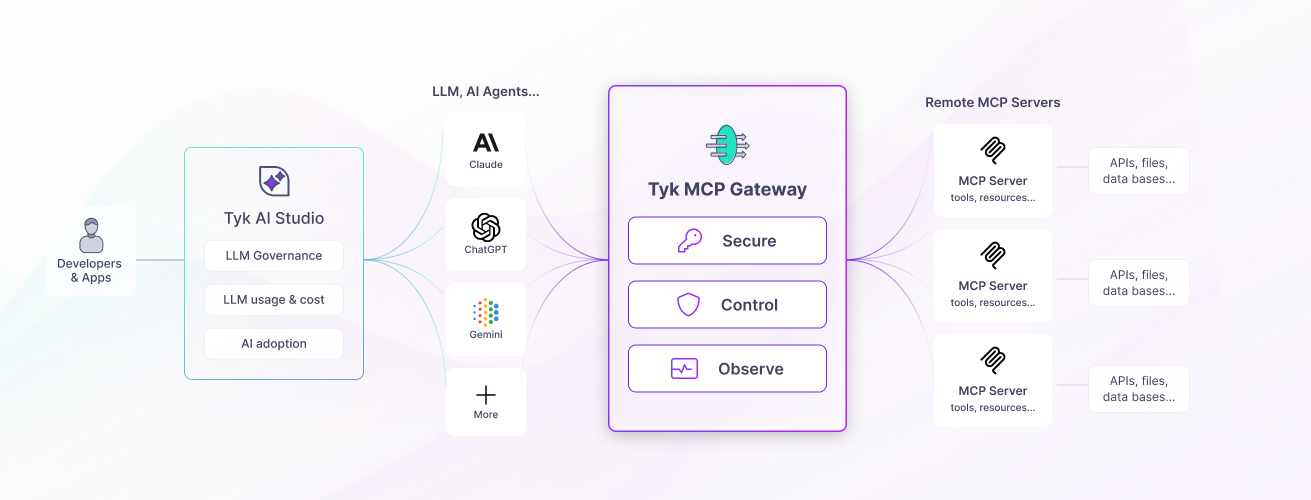
Tyk Gateway addresses these challenges natively, sitting between MCP clients and the servers or APIs behind them, to enforce authentication, access policies, rate limits, and traffic governance on every JSON-RPC request. This applies whether an MCP proxy fronts a remote MCP server or is generated directly from a Tyk-managed REST API.
What is MCP?
MCP uses a client-server model: an MCP client (an AI agent or framework) connects to an MCP server that exposes tools, resources, and prompts through JSON-RPC 2.0 messages over HTTP. For the full protocol reference, see MCP Gateway: Core Concepts or the MCP specification.The problem with ungoverned MCP
Remote MCP servers are HTTP services. Like any HTTP service, they need authentication, rate limiting, access control, and observability to be operated reliably at scale. Without a gateway layer, each individual server must address these concerns on its own (if at all), leading to: Inconsistent security. Each MCP server implements its own authentication, or none at all. No central place exists to enforce who can access which tools, rotate credentials, or revoke access. No visibility. No standard way exists to see which AI agents are calling which tools, how often, and whether calls are succeeding. Troubleshooting failures or planning capacity requires digging into individual server logs. Ungoverned proliferation. MCP servers can appear across teams without oversight. No registry exists of what is available, no approval process, and no way to apply organization-wide policies consistently. Fragile direct connections. AI agents connecting directly to MCP servers have no protection if a server is slow or unavailable. Rate limits, circuit breakers, and timeouts must be rebuilt on every server independently.Where Tyk fits
Tyk Gateway sits in front of your MCP servers and Tyk-managed REST APIs, proxying all MCP traffic through a centrally managed gateway layer. The same governance applies whether an MCP proxy fronts a remote MCP server or is generated directly from a Tyk-managed REST API. AI clients connect to Tyk at a configured listen path; Tyk authenticates the request, applies the configured middleware chain, and forwards the request to the upstream MCP server or REST API. The Tyk Dashboard serves as the registry layer, the central catalog of every MCP proxy in your organization, with the access policies and observability that govern how each one is used.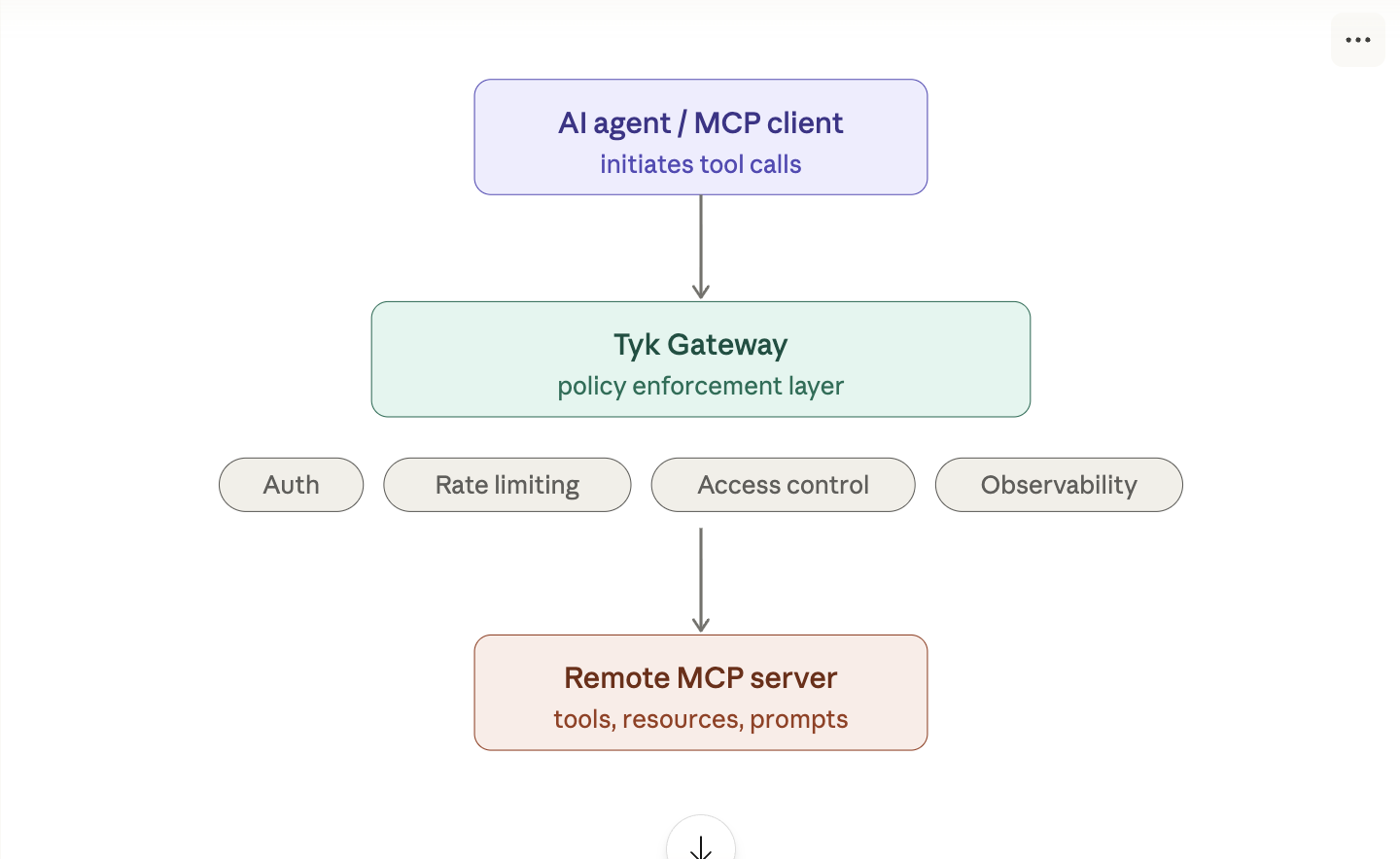
POST /mcp and GET /mcp. For details, see Transport.
How Tyk represents MCP proxies
Tyk models each MCP proxy as a Tyk OAS API definition, an OpenAPI document extended with thex-tyk-api-gateway vendor extension. This is the same format used for REST APIs, so MCP proxies share the same configuration model, tooling, and management APIs as the rest of your Tyk estate, whether the proxy fronts a remote MCP server or is generated directly from a Tyk-managed REST API.
REST API to MCP proxies also carry an x-tyk-mcp-server vendor extension, which defines which REST operations become MCP tools and how they’re presented to agents. See MCP proxy definitions for the full schema.
You create and manage MCP proxy definitions through the Tyk Dashboard or the Gateway API. No changes to your upstream MCP server, or the source REST API, are required.
MCP proxy definitions require Tyk OAS format. When a proxy is generated from a REST API, the source must also be a Tyk OAS REST API: GraphQL APIs and Tyk Classic API definitions aren’t supported as a source. See REST API to MCP for details.
What Tyk MCP Gateway provides
Authentication and key management
Tyk authenticates every MCP request before it reaches your upstream server. All authentication methods supported for REST APIs work identically for MCP: bearer tokens, API keys, JWT, OAuth 2.0, and mTLS. You issue and manage API keys through the Tyk Dashboard or API, and every key is associated with a security policy that defines what it can access and at what rate. This means your MCP servers don’t need to implement their own authentication. Tyk handles credential verification, token validation, and key lifecycle centrally: rotation, expiration, and revocation. The MCP specification mandates OAuth 2.1 as the authorization framework and requires MCP servers to implement Protected Resource Metadata (PRM), a discovery document that tells OAuth-aware clients which authorization server to use and which scopes the resource supports. Tyk implements PRM natively: it serves the/.well-known/oauth-protected-resource endpoint automatically and returns the correct WWW-Authenticate challenge on unauthenticated requests, so compliant MCP clients can self-configure without any pre-configuration. See OAuth 2.1 authentication for the full implementation details.
Access control and policy enforcement
Security policies give each consumer its own access rules and limits. For MCP proxies, a policy can control which proxies, JSON-RPC methods, tools, resources, and prompts a key can use, with rate limits at each level. See MCP Gateway policies. This is what makes it practical to serve many different AI agents from a single MCP proxy. A read-only analyst agent and a privileged administrator agent can share the same upstream server but operate within completely different entitlements, each enforced at the gateway without any changes to the upstream. Tyk also filters discovery responses, so each agent sees only the primitives that it can call. See Discovery.Service registry
The MCP section of the Tyk Dashboard is the central registry of every MCP proxy in your organization. See Managing MCP proxies.Traffic management
Tyk applies rate limits, timeouts, circuit breakers, and request size limits to MCP traffic, down to the individual tool, resource, or prompt. See Traffic management and MCP Gateway policies.Analytics
Tyk records analytics for every MCP request and exposes them in the Tyk Dashboard under Monitoring → Activity by MCP. Analytics are captured at two levels. Proxy-level charts show total request volume, error counts, and HTTP error code distribution across all your MCP proxies. Use these to compare traffic and error rates between proxies and identify trends over time. Primitive-level charts break the data down by individual tool, resource, or prompt: call volumes over time, most frequently called primitives, highest error rates, and slowest average latency. These charts show exactly which tools AI agents are calling, which are failing, and which are your performance bottlenecks, without any additional instrumentation. Both levels of data appear alongside your REST and GraphQL API analytics, giving you a unified view of your entire API estate. See MCP observability.Observability
Beyond the Dashboard analytics page, Tyk emits MCP-specific observability signals that integrate with your existing monitoring infrastructure. Structured access logs include four MCP-specific fields on every logged request: the JSON-RPC method invoked (mcp_method), the primitive type (mcp_primitive_type), the primitive name (mcp_primitive_name), and a gateway-mapped error code when the request fails at the gateway layer (mcp_error_code). These fields let you filter and aggregate MCP traffic in your log management tooling using the same pipeline you use for REST APIs. See MCP access logs.
OpenTelemetry metrics: when OTel is enabled on the gateway, Tyk emits four MCP-specific metric instruments covering request counts (with dimensions for method, primitive type, tool name, and error code), method distribution, upstream latency per tool, and end-to-end request latency. These metrics can be scraped by Prometheus and used to build dashboards in Grafana or your preferred metrics platform. See MCP metrics and How to build a Grafana dashboard for MCP traffic.
How Tyk compares
See how Tyk MCP Gateway compares to other API and MCP gateways:Requirements and limitations
Requirements
Supported transports
Tyk MCP Gateway supports only the Streamable HTTP transport (POST /mcp and GET /mcp). It does not support stdio or the legacy HTTP+SSE transport. For details, see Transport.
REST API to MCP proxies
Tyk Gateway can also generate an MCP proxy directly from a Tyk-managed REST API, without building or hosting a separate MCP server. See REST API to MCP. This capability requires Tyk Enterprise Edition. Only Tyk OAS REST APIs already onboarded to Tyk are supported as a source: GraphQL APIs and Tyk Classic API definitions cannot be converted to MCP tools. These proxies support only thePOST /mcp transport; they do not expose GET /mcp, SSE streaming, or server-initiated notifications.
MCP specification version
Tyk supports the MCP2025-11-25 specification. For the full protocol reference, see the MCP specification.