

What Policies Are For
A policy is a reusable template applied to one or more API keys. Rather than configuring limits and access rights on each key individually, you define them once in a policy and issue keys that inherit those rules automatically. When you update the policy, every key bound to it picks up the change. For MCP proxies, policies serve three purposes: Controlling access: a policy determines which MCP proxies a consumer key can reach. Without an entry in the policy’s access rights, the consumer receives403 Forbidden regardless of what key they present.
Governing MCP capabilities: beyond proxy-level access, policies let you restrict which JSON-RPC methods a consumer can use and which specific tools, resources, and prompts they can invoke. This lets you give different consumers different views of the same MCP proxy without creating separate proxy definitions.
Enforcing usage limits: policies apply rate limits at several levels: across the whole policy, per MCP proxy, per JSON-RPC method, and per named primitive. Each consumer key tracks its own independent counters.
What MCP Policies Control
Access Control
Tyk evaluates access control at three levels, in order: Proxy access: the policy’s access rights list determines which MCP proxies the key can reach. A key can only call a proxy listed in its access rights. JSON-RPC method access (json_rpc_methods_access_rights): controls which protocol-level operations the consumer may use. For example, you can allow tools/call and tools/list while blocking sampling/createMessage. Use an allowed list to restrict to specific methods, or a blocked list to exclude specific methods while permitting all others.
Method rules match the methods that clients actually send, and those depend on the protocol version. Clients using 2026-07-28 don’t send session methods such as initialize and ping, so a method rule or rate limit keyed on one of them never matches that traffic. See Session Methods and Headers.
Primitive access (mcp_access_rights): controls which specific tools, resources, and prompts the consumer can invoke. Each primitive type (tools, resources, prompts) has its own allowed and blocked list. Values are Go regular expressions, so "internal_.*" matches any tool whose name starts with internal_. A non-empty allowed list acts as an explicit allowlist; blocked entries are excluded from whatever is otherwise permitted.
Policy rules apply in addition to the proxy’s own allow and block middleware. A policy cannot give a key access to a primitive that the proxy blocks.
How Access Rules Shape Discovery
Access rules also control what a consumer can discover. Tyk removes the tools, resources and prompts that a consumer cannot call from list results. See Discovery. Tyk also removes a capability from theserver/discover result when method rules deny any method that capability needs. If your clients use 2025-11-25, the same applies to the initialize result. For example, a method allowlist that doesn’t include resources/templates/list removes the whole resources capability. The following table shows the methods each capability needs.
A filtered result is specific to the consumer’s key, so Tyk marks it with
"cacheScope": "private" and "ttlMs": 0. See Cache Hints on Filtered Results.
Rate Limiting
Rate limits can be applied at four levels within a policy entry for an MCP proxy: Policy global: the top-levelrate and per fields on the policy apply across all APIs the key accesses.
Per MCP proxy: the limit field inside an access rights entry applies a rate limit specific to calls to that proxy, independent of the consumer’s overall policy rate.
Per JSON-RPC method (json_rpc_methods): sets a rate limit for calls using a specific method name, such as tools/call. The counter applies across all tools invoked via that method.
Per primitive (mcp_primitives): sets a rate limit scoped to a specific named tool, resource, or prompt. A consumer who exhausts their limit on generate_report is blocked from calling that tool while remaining free to call others.
All applicable limits are checked independently on every call. Whichever is exhausted first blocks the request. For example, a call to get_report counts against both the tools/call method limit and the get_report primitive limit, if both are set.
Method and primitive limits (json_rpc_methods and mcp_primitives) are rate limits only. They do not support quotas or throttling.
The proxy’s own middleware rate limit also applies. It is shared by all consumers. See Policies versus middleware.
Quotas
A quota sets a maximum total number of calls over a renewal period (daily, weekly, or monthly). A consumer who exhausts their quota receives429 Too Many Requests until the period resets. Quotas are configured at the policy level using quota_max and quota_renewal_rate. See Quotas for details.
Configuring MCP Policies
Using the Tyk Dashboard
-
In the Tyk Dashboard sidebar, click Policies then Add Policy.
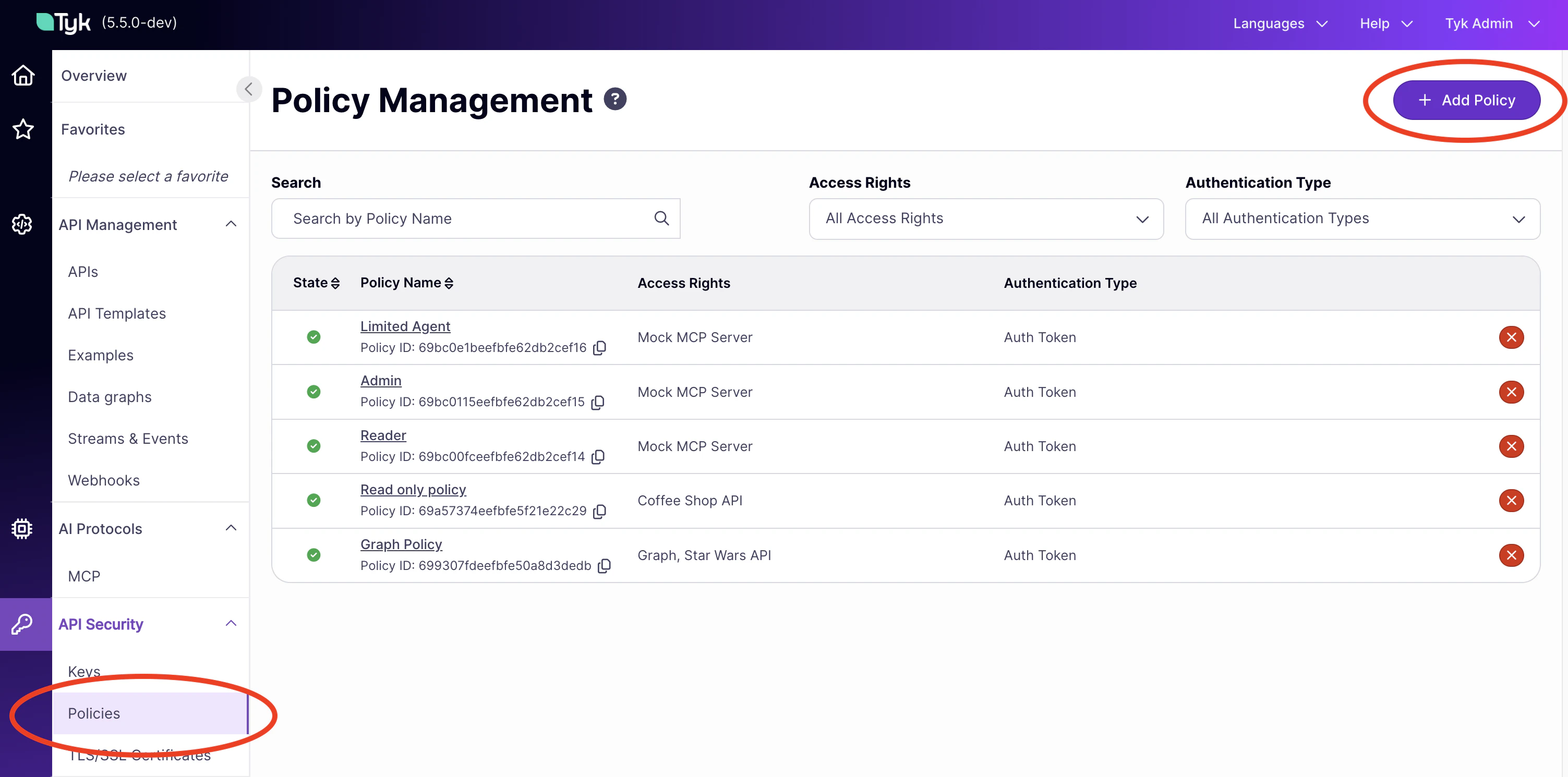
- On the Access Rights tab, find your MCP proxy in the list and click it to add it to the policy.
- Expand the proxy’s access rights block. You will see sections for primitive rate limits and access control.
- To configure primitive rate limits, click Add Rate Limit. Set the Rate and Per (in seconds) values, then click Add Primitive to associate a named tool, resource, or prompt with that limit. Add multiple primitives to the same group if they share a limit; create separate groups for different limits.
- To configure access control for tools, resources, and prompts, use the Primitive based access section within the access rights block. Add a name, select the type, and set it to Allowed or Blocked.
- On the Configurations tab, set the policy name, key expiry, and global rate limit.
- Click Create Policy.
Using the Dashboard API
Create or update a policy viaPOST /api/portal/policies (create) or PUT /api/portal/policies/{policy-id} (update). The MCP-specific fields sit inside the access_rights entry for each MCP proxy.
The following example creates a policy that grants access to a weather MCP proxy, restricts which JSON-RPC methods the consumer can use, limits them to specific tools, and applies per-primitive rate limits:
An allowlist denies every method it doesn’t name. Include the methods clients need to connect:
server/discover for 2026-07-28 clients, and initialize and notifications/initialized for 2025-11-25 clients. 2025-11-25 clients also need notifications/cancelled to cancel calls in progress. Also include every method that a capability needs, or Tyk removes that capability from the discovery result.Policy Schema for MCP
The MCP-specific fields appear inside each entry in theaccess_rights object, alongside the standard limit and versions fields.
Access Rights Entry
mcp_access_rights Object
Controls which primitives the consumer can invoke. Each of the three sub-objects follows the same structure.
Patterns must match the whole name. For example,
get_.* matches get_forecast but not forecast_get_all.
Leave a sub-object empty ({}) to apply no restrictions for that primitive type.
mcp_primitives Array
Each entry defines a rate limit for one named primitive.
Entries are matched by
type and name together. A tool named weather and a resource named weather are independent entries with independent counters.
json_rpc_methods Array
Each entry defines a rate limit for one JSON-RPC method.
Top-Level Policy Fields
When Multiple Policies Apply
A consumer key can have multiple policies applied to it. Tyk merges MCP-specific fields as follows:- Rate limits: the highest effective request rate wins. If two policies define a limit for the same primitive, Tyk compares
ratedivided byperand applies the limit that allows more requests. See Combining Multiple Policies Configuring Rate Limits. mcp_access_rightsandjson_rpc_methods_access_rights:allowedlists are merged by union (the consumer gains access to the combined set).blockedlists are also unioned, so a primitive blocked in any policy remains blocked. A policy that sets no rules for a field is ignored when merging, so it does not widen an allowlist that another policy sets. For example, if one policy allows onlytools/listandtools/calland a second policy sets no method rules, the consumer can call only those two methods.- Proxy access: the consumer gains access to the union of all proxies listed across all their policies.
mcp_access_rights, the key can call only those four tools. A primitive that any policy blocks stays blocked, even if another policy allows it.
Applying a Policy to a Consumer
A policy takes effect when it is applied to an access key. In the Tyk Dashboard, go to Keys, click Add Key, select the policy from the Apply Policy dropdown, and generate the key. Issue the key to the consumer; they include it in theAuthorization header of every MCP request.
See Policies for full details.